
How to Select the Best Photocopy Machine for Office Use
How to Select the Best Photocopy Machine for Office Use in Sri Lanka
Choosing the right photocopy machine for an office is an important decision. A photocopier is often used every working day for copying, printing, scanning and handling important business documents. Selecting a machine based only on the purchase price can lead to higher running costs, slower productivity and frequent maintenance problems.
If you are looking for the best photocopy machine for office use in Sri Lanka, you should consider your monthly document volume, required paper sizes, copy speed, colour requirements, scanning needs, duplex functionality, connectivity, running costs, warranty and after-sales service.
At LankaPhotocopyMachines.com, you can find photocopy machines from popular brands including Toshiba, Canon, Ricoh, Sharp, Epson, Brother, Kyocera and other leading brands for different office requirements.
1. Understand Your Office's Monthly Copy and Print Volume
The first step in selecting a photocopy machine is determining how many documents your office produces every month.
A small office may only need a few thousand pages per month, while a large company, school, government office or business centre may require tens of thousands of copies.
Before purchasing a photocopier, estimate:
Average copies per day
Average printed pages per day
Monthly document volume
Number of employees using the machine
Number of documents that need scanning
Frequency of large print jobs
The machine should be capable of handling your expected workload comfortably. A government procurement specification, for example, may specify a recommended monthly duty cycle of 80,000 sheets or more for a higher-volume office machine.
Avoid choosing a very small machine for a busy office simply because it has a lower initial cost.
2. Decide Between A4 and A3 Photocopy Machines
Paper size is another important consideration.
If your office mainly works with A4 documents such as letters, invoices, reports and general correspondence, an A4 multifunction machine may be sufficient.
However, an A3 photocopy machine is a better choice if your office regularly handles:
A3 reports
Architectural drawings
Business presentations
Posters
Large spreadsheets
School or training documents
Brochures
A3 forms
Many business-grade photocopiers support multiple paper sizes, including A4, A3, A5, B5 and Legal.
If you are unsure whether you will need A3 in the future, choosing an A3-capable photocopier can provide greater flexibility for your office.
3. Choose the Correct Copy Speed
Copy speed is normally measured in pages per minute (PPM) or copies per minute (CPM).
For a small office, an extremely high-speed machine may not be necessary. For a busy office with several employees sharing one photocopier, higher speed can significantly improve productivity.
For example:
Small office: approximately 15–25 PPM
Medium office: approximately 25–40 PPM
Busy office: 40 PPM or higher
High-volume environments: consider higher-speed production machines
The ideal speed depends on your actual workload rather than simply choosing the fastest available machine.
A Sri Lankan government procurement specification for a multifunction photocopy machine, for example, specifies 25 CPM/PPM or above for both copying and printing.
4. Consider a Multifunction Photocopy Machine
Modern office photocopiers can do much more than make copies.
A multifunction photocopy machine can combine:
Copy + Print + Scan + Optional Fax
This can reduce the need for separate office equipment and make document management easier.
For many offices, a multifunction photocopier is a practical choice because employees can print documents from computers, scan documents to a computer or email and make copies using the same machine.
When comparing models, look for the functions that your office actually needs rather than paying extra for features you will rarely use.
5. Look for Automatic Document Feeder (ADF)
An Automatic Document Feeder (ADF) is extremely useful for offices that regularly copy or scan multiple pages.
Instead of placing every page manually on the scanner glass, employees can place a stack of documents into the feeder and allow the machine to process them automatically.
For offices handling contracts, reports, applications, invoices and other multi-page documents, an ADF can save considerable time.
For higher-volume scanning, consider a machine with a Duplex Automatic Document Feeder (DADF) or similar two-sided scanning capability.
6. Automatic Duplex Printing and Copying
Duplex functionality allows the machine to print or copy on both sides of the paper.
This is particularly useful for offices that produce:
Reports
Meeting documents
Internal documents
Training materials
Business proposals
Manuals
Multi-page documents
Two-sided printing can reduce paper consumption and help make document handling more efficient.
For example, automatic two-sided printing and copying is included among the requirements in some Sri Lankan public-sector multifunction copier specifications.
If your office produces a large number of documents, automatic duplexing should be one of the important features on your checklist.
7. Check Paper Tray Capacity
Paper capacity becomes important when a photocopier is used frequently.
A small paper tray may require employees to refill paper several times during the day. A larger paper capacity can reduce interruptions.
When comparing machines, check:
Main paper tray capacity
Number of paper trays
Bypass tray capacity
Supported paper sizes
Optional additional trays
For example, one Sri Lankan procurement specification calls for two standard 500-sheet paper cassettes and a 100-sheet bypass tray for a particular class of multifunction machine.
Your office may not need that much capacity, but the example shows why paper handling should be considered when selecting an office photocopier.
8. Check Network Connectivity
For an office environment, network connectivity is extremely important.
A network-enabled photocopy machine allows multiple employees to use the same machine from their computers.
Look for features such as:
Ethernet network connectivity
Wi-Fi where required
USB connectivity
Network printing
Network scanning
Scan to email
Scan to folder
Direct USB printing
Network scanning is especially useful for offices that need to digitise documents and distribute them electronically.
Some professional specifications include USB, Ethernet, Wi-Fi, USB direct printing and scan-to-email/PC/folder as required connectivity features.
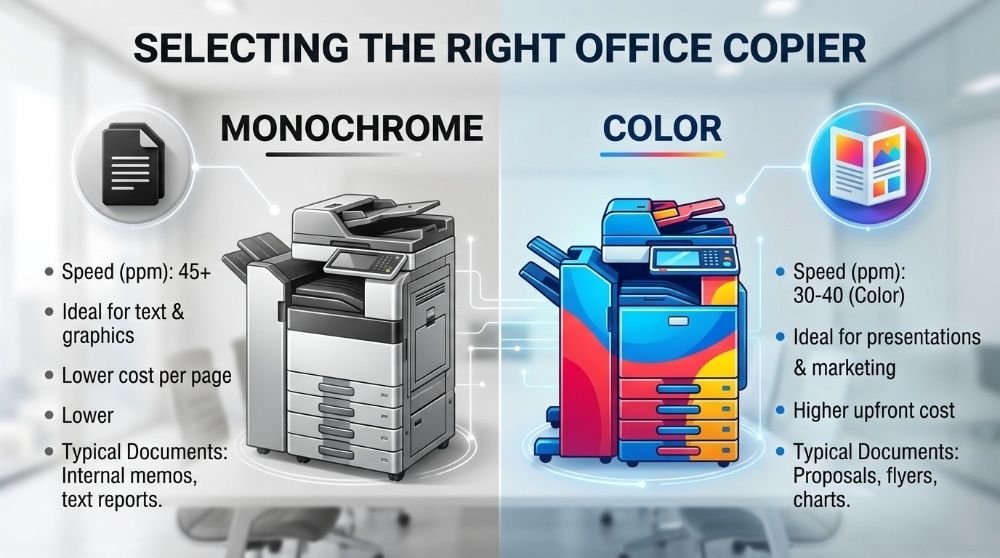
9. Decide Between Black-and-White and Colour
Not every office needs a colour photocopier.
A monochrome photocopier is generally suitable when the majority of documents are black and white, such as:
Invoices
Letters
Reports
Contracts
Internal documents
Government forms
A colour photocopy machine is more suitable when your business regularly produces colour documents such as:
Marketing materials
Presentations
Brochures
Colour reports
Training materials
Business proposals
If colour copying is only occasionally required, you may find that a monochrome office photocopier combined with a separate colour printer is more practical.
10. Compare Cost Per Copy, Not Only Purchase Price
One of the biggest mistakes when buying a photocopy machine is looking only at the initial purchase price.
The total cost of ownership can include:
Toner or ink
Drum
Developer
Maintenance
Replacement parts
Electricity
Service charges
Paper
Other consumables
A machine with a slightly higher initial price may be more economical over several years if it has efficient consumables and reliable operation.
Before purchasing, ask the supplier about the estimated cost per copy and the expected life of major consumable components.
Sri Lankan office-equipment specifications also recognise cost per copy and toner/ink capacity as important purchasing considerations.
11. Check Monthly Duty Cycle
The monthly duty cycle indicates the volume of documents a machine is designed to handle.
Do not select a machine that is too small for your office workload.
For example, if your office regularly produces a large volume of documents, selecting a business-class machine designed for higher workloads can provide better reliability than using a small desktop multifunction printer continuously.
The recommended monthly volume is particularly important when comparing different photocopier categories.
12. Consider Warm-Up and First-Copy Performance
For offices where employees frequently make small batches of copies throughout the day, warm-up time can affect productivity.
A machine with a shorter warm-up time can become ready more quickly after being switched on or coming out of standby.
First-copy time is also useful to consider when employees frequently need only one or two copies at a time.
13. Think About Security
Modern offices often process confidential documents.
Businesses such as accounting firms, law offices, financial institutions, schools and corporate offices may handle sensitive information.
Depending on the model, consider features such as:
User authentication
Secure printing
PIN-protected documents
Address book controls
Network security
Secure data handling
If your office handles confidential information, ask the supplier which security features are available on the specific model you are considering.
14. Choose a Reliable Brand
Brand reputation is another factor to consider when buying a photocopier.
Popular brands available in the Sri Lankan market include:
Toshiba
Canon
Ricoh
Sharp
Epson
Brother
Kyocera
Konica
The best brand for your office depends on your required features, workload, budget, consumable availability and local technical support.
LankaPhotocopyMachines.com currently lists photocopy machines from several major brands, including Toshiba, Canon, Ricoh, Sharp, Epson, Brother, Konica and Kyocera.
15. Check Warranty and After-Sales Service
A photocopy machine is a long-term office investment. Even a reliable machine can eventually require servicing or replacement parts.
Before purchasing, ask:
What warranty is provided?
Is it a genuine company warranty?
Is technical support available in Sri Lanka?
How quickly can service technicians respond?
Are original parts available?
Are genuine toner and consumables available?
Is installation included?
Is user training available?
Good after-sales service can be just as important as the machine itself.
For example, products listed on LankaPhotocopyMachines.com include models advertised with warranty and after-sales service.
16. Think About Your Future Office Requirements
Do not only consider what your office needs today.
Your business may grow, and document volumes may increase.
If you expect more employees, higher printing volumes or greater scanning requirements in the future, consider purchasing a machine with additional capacity.
For example, you may want:
Higher copy speed
Additional paper trays
A larger ADF
A3 capability
Duplex printing
Network scanning
Colour capability
Optional finishing equipment
Choosing a machine with some room for future growth can prevent the need for an early replacement.
17. New vs. Reconditioned Photocopy Machines
Another decision is whether to purchase a brand-new or reconditioned photocopy machine.
A new machine can provide the latest technology, manufacturer support and warranty.
A quality reconditioned machine may offer a lower initial investment, but you should carefully check:
Machine condition
Copy counter
Previous usage
Drum condition
Developer condition
Availability of replacement parts
Warranty
Service history
If choosing a reconditioned machine, purchase from a supplier who can provide proper technical support and a clear warranty.
18. Popular Office Photocopy Machine Options in Sri Lanka
The right model depends on your requirements, but the Sri Lankan market includes office photocopiers from brands such as Toshiba, Canon, Ricoh and Sharp.
For example, LankaPhotocopyMachines.com currently lists models such as the Toshiba E-Studio 2523A, Toshiba E-Studio 2329A, Canon iR2224N, Ricoh M2310N, Ricoh M2700 and Sharp AR-6020NV, among other options.
For colour office environments, models such as the Toshiba E-Studio 3015AC provide A3 colour multifunction functionality and are designed for office, shop and institutional use.
The important point is not to choose a model simply because it is popular. Compare the specifications with your actual office workload.
19. Best Photocopy Machine for Different Office Requirements
There is no single photocopier that is best for every business.
Small Office
Consider:
Compact multifunction machine
A4 or A3 depending on requirements
Moderate copy speed
Network printing
Scanning
Duplex functionality
Low running cost
Medium-Sized Office
Consider:
A3 multifunction photocopier
Around 25–40 PPM or higher
Automatic document feeder
Duplex copying and printing
Network scanning
Multiple paper trays
Good monthly duty cycle
Large Office
Consider:
High-speed A3 multifunction copier
Higher monthly duty cycle
Large paper capacity
High-capacity ADF
Fast network scanning
Advanced security
Optional finishing features
Strong technical support
School or Institute
Consider:
High-volume document handling
A3 support
Automatic duplex
High-capacity paper trays
Reliable monochrome copying
Low cost per page
Strong service support
20. Final Checklist Before Buying a Photocopy Machine
Before purchasing your next office photocopier in Sri Lanka, check the following:
Required monthly copy volume
A4 or A3 requirement
Black-and-white or colour
Copy and print speed
Monthly duty cycle
Automatic document feeder
Duplex printing and copying
Duplex scanning
Paper tray capacity
Network connectivity
Scan-to-email or network scanning
Cost per copy
Toner and consumable availability
Warranty
Technical support
Availability of spare parts
Future office requirements
Conclusion
Selecting the best photocopy machine for office use in Sri Lanka requires more than comparing purchase prices. The right machine should match your office's workload, paper sizes, required speed, scanning requirements, colour needs and expected running costs.
For many offices, an A3 multifunction photocopier with automatic document feeding, duplex printing, network connectivity and reliable scanning can provide an excellent balance of productivity and convenience.
Before making your final decision, compare the specifications, running costs, warranty and after-sales service of several models. LankaPhotocopyMachines.com provides a range of photocopy machines from leading brands for offices, businesses, schools and institutions in Sri Lanka.
If you are unsure which model is suitable for your office, contact a photocopier supplier and provide your estimated monthly volume, required paper sizes and preferred functions. A supplier can then recommend a machine that matches your actual requirements rather than simply recommending the most expensive model.